Wednesday, December 22, 2021

Define Naughty Please...

Hello

Today I show you the result of making a montage with the help of an image editor to create a card with Oddball Stamps 


To do it you can use any digital stamp from Oddball Stamps, and with the help of the GIMP program, an image editor, I created a simple scene to print and color directly.


To carry out this process, it is preferable to use the stamps you use on your card in png format since, as they have no background or are transparent, it is much easier to move them and place them in the desired positions without blocking each other.

After placing the stamps in the desired arrangement, save your creation in jpg or png format and print it to the desired size. You can create your card in real size from scratch and simply print it or another size and enlarge or reduce it at will when printing.

After printing, only coloring remains. As a medium I used my Finecolour alcohol markers, but you can use whatever medium you want.

Paste the resulting panel on a colored card (in my case black) and this on the card base. And ready!

You already have a finished “one layer” or “one layer” card.


I hope you like the result and put this technique into practice.

I remind you that you have the discount code DTIRENE10 for your purchases in the Oddball Stamps store and the hashtag #creepycutechronicles to share your work on the networks.

See you!
Tuesday, December 21, 2021

Have a Holly Jolly Christmas

 Hi crafty friends

It's the most Wonderfull time of the year! A Holiday that we are celebrating all over the world.

The perfect time to make some greeting cards for friends and family. 

I made this Christmas card using Big Eye Alex at Christmas Holiday. Love her Christmas outfit and festive bows.

https://www.oddballartco.com/product-page/digital-stamp-kawaii-big-eye-alex-at-christmas-holiday-alex-image-no-357

I colored her with Copic Markers.

The background is inspired by a patchwork blanket. Just squares of Christmas paper sewn together. And some glittery stars to add some sparkle. And this cutie definitely deserved some gift.

I love how she turned out! So festive and cute. And of course she tried to be Nice 😃.

I hope I could inspire you with this card and I want to wish you all a Holly Jolly Christmas.


Monday, December 20, 2021

Card "Christmas Wishes" by Roberta Cercato


Happy Monday friends!
It's the last week ... and then it's Christmas!

Today I present to you my project for Oddball Stamps, a cute zebra fallen into the orange paint pot !!
To make it I used the digital Kawaii Christmas Zebra Zeddy As Santa Image No. 153 which I colored with Spectrum Noir Classique alcohol markers.

How about? Isn't this Christmas zebra cute?
Soon,
Roberta


Sunday, December 19, 2021

Easy last minute Christmas card

 Hi everyone!

Christmas is already around the corner and you might realize that you don't have enough Christmas cards 😮

Here's a simple and easy last minute Christmas card idea. The easiest way includes only using a text editor, printing and cutting.

I wanted to make something not so traditional Christmas so I chose to use paper from Bats and bones Halloween paper set and just simple HoHoHo text from CCC#134 Jones in the box digi stamp set.

So, I added the digi paper to the text editor and the uncoloured version of HoHoHo text (there's also coloured version if you want to do something really easy). You should use the png file so there is no white background around the image. 


When I was happy with the sizes and layout I printed it. I coloured the image with alcohol markers (Copic R59, ProMarker Berry Red, Copics R29, R27 & R22) and white gel pen.

Then I just cut the card and taped it on the black card board.
 
And here's the result. Simple, but I like it 😊


With this code DTMER1  
you can buy 2 digi stamps from
Oddball Stamps
and pay only one.
The more the merrier!


Happy crafting and Merry Christmas!


Sunday, November 28, 2021

Tag "Thank you" by Roberta Cercato


Good Sunday friends!
Today I present to you my design for Oddball Stamps, a "botched" tag!

To make it I used the digital Big eye girl lexi image no. 5 which I colored with Spectrum Noir Classique alcohol markers.

To create the background, I used the gel press, some stencils, abstract stamps and a little white chalk instead.

Did you like my project?

See you soon,
Roberta


Saturday, November 27, 2021

Let me sleep

Happy Saturday everyone!

I used this fun CCC#87 Haunted Cuckoo Clock image and wanted to create a 'Do not disturb' kind of sign on my craft room door.. Well, as you can see the result isn't quite what it was meant to be 😛

I wanted to create a little more texture on this card/sign/whatever this is going to be. I coloured the walls and cutie birdie with alcohol markers. The roofs I coated with texture paste and I also added Glossy Accents on the clock part. 

I'm not a morning person so this is still quite me 😊


With this code DTMER1  
you can buy 2 digi stamps from
Oddball Stamps
and pay only one.
The more the merrier!


Happy crafting!


Friday, November 26, 2021

Sending you... Best witches!

Hello

For today I have an “Iris” card for you, interactive and very simple to make as inspiration for the DT of Oddball Stamps.


There are dies to make it, but also cutting files for the plotter that make your work much easier. But if you don't have the dies or a plotter, you can still use the cutting files, printing and cutting by hand.


To star in the card, I used the digital stamp "Whimsical Witch on Broomstick, Wendy Friends" from Oddball Stamps.


Once colored with my Finecolour alcohol rotus and cut out, I made the mechanism for the interactive part. You can find cut files for this card in the Silhouette store, but you can also find some for free on the web. In my case I used ShanShan Mato's file that you can find on his YouTube channel.


Finally I did the background panel by inking in shades of blue, purple and a touch of black, I drew stars with a white gel pen and added the first part of the feeling.

On a card base I glued the second part of the sentiment (the one that is hidden by the mechanism) and finally I assembled and glued all the elements in place.


It may seem complicated, but it hardly takes time to do it and it is very attractive

I hope you like and inspire.


I remind you that you have the discount code DTIRENE10 for your purchases in the Oddball Stamps store and the hashtag #creepycutechronicles to share your work on the networks.

See you!

Monday, November 22, 2021

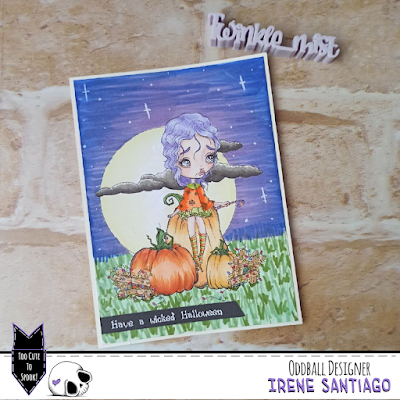
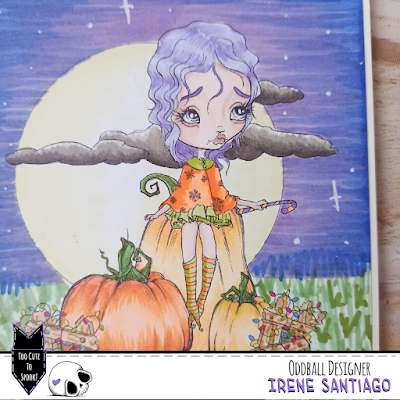
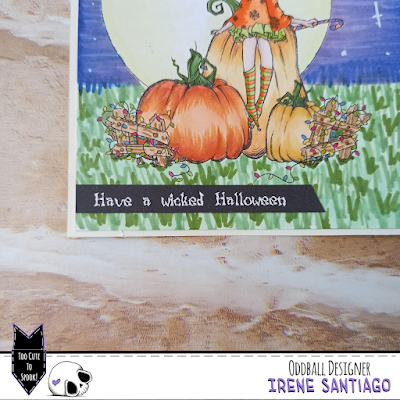
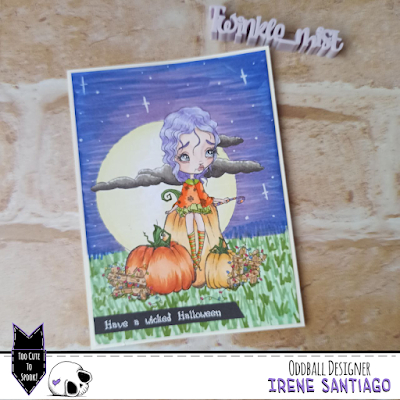
Have a Wicked Halloween!

Hello!

For today I bring you a very simple but beautiful single layer card with Oddball Stamps


The main image is img# 356 Pumpkin Patch A Christmas Dream, as it is given in the download zip.

I just resized the image to my card size and printed.


Once this was done I colored the scene with my Finecolours, masking some areas if needed.

To finish, I glued a sentiment printed in white with a black background. (I am aware that it says Halloween and it is over... but you can change it for Christmas or any other holiday!)


As you can see, very simple and fast to do.


I hope you like it and it inspires, and above all that it encourages you to make your own creations.

I remind you that you have the discount code DTIRENE10 for your purchases in the Oddball Stamps store and the hashtag #creepycutechronicles to share your work on the networks.

See you!