Saturday, August 21, 2021

Fintastic!

Happy Saturday!


This time I wanted to do a something with a twist and this is what happened :)

I used IMG #476 Fortune Tellers Circus Magic Glass Ball & IMG #410 Whimsical Goldfish & Bubbles, assembled those with text editor and printed it. I coloured the image with alcohol markers and white gel pen. 
 
 I used Halloween 2018 Stay Creepy digi paper pack on the front and then I die cut an opening to a card base (I wanted to tape the image inside the card, so that there is little surprise). 
 
I also added die cut anchor and stamped New Job text.


And here's the inside part.

Fintastic is stamped and I doodled the frame.


With this code DTMER1  
you can buy 2 digi stamps from
Oddball Stamps
and pay only one.
The more the merrier!


Happy crafting!


-Merja-

Friday, August 20, 2021

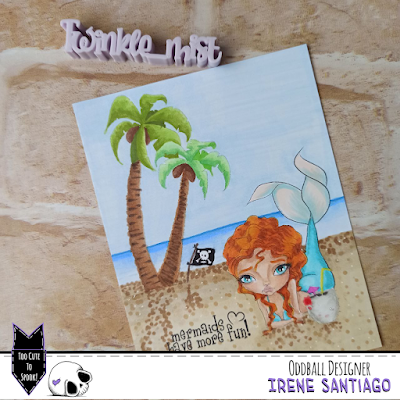
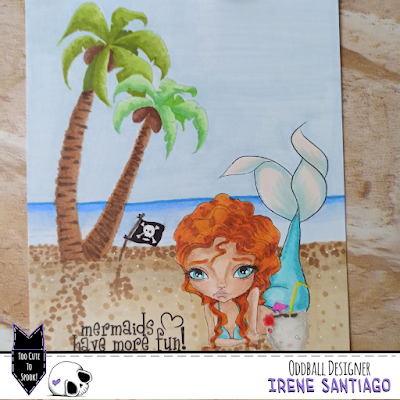
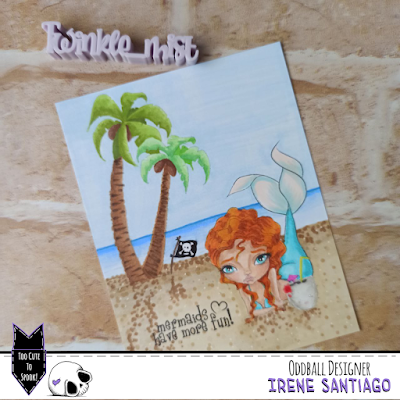
Mermaids have more fun!

Hi there!

Today's tutorial is on how to make a “one layer” card with your Oddball Stamps digital images.


Lately I have shown you several card designs with backgrounds drawn and colored by me, freehand. But if you do not feel safe and do not dare to try it on your own, you can make use of some digital stamps that would form a very simple background, but it turned out.


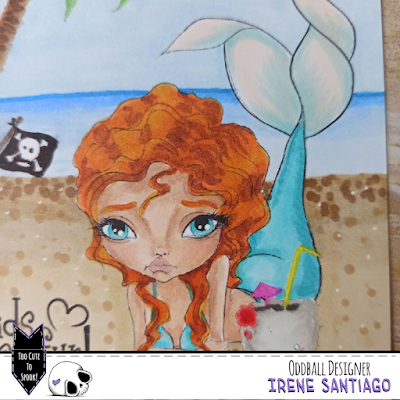
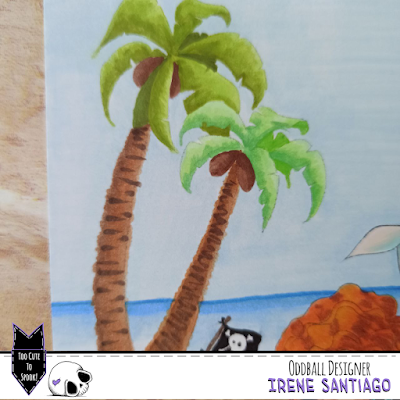
In the case of this card I have used the images #320 Mermaid Nixie Spirit of the Sea, #505 Creepy Cute Coconut and #507 Palm Trees, Flag & Sentiment Pirate Coves to create an island where to put the mermaid having a coconut soda while rests lying on the sand.

Doing it does not require much knowledge, just have a photo editing program installed and use the .png files that come in the .rar folders that you get when you buy the stamps.


I always use GIMP, a very easy-to-use free software with many utilities (very similar to Photoshop).

When you open your program, you can load the images or create a new document with the dimensions you want. I chose the size of a card. Then you simply upload your stamps, resize them and place them to the size and position in which you want them in your scene. To superimpose one on top of the other (as in the case of the coconut that is above the mermaid) or when loading the images, you do it in order from the furthest to the closest, or you reorder the layers of your file. When you have the basic scene (no horizon lines or any other details, just the stamps in the correct position and size), save your file in .png format


Then it is to follow the steps we normally take to print our digital stamps. Open a .doc, you don't need to resize since you saved it to the size of your card, and you print.

Once in paper format, you just have to color it with your favorite medium and you will get a finished panel ready to stick on your card base.

Super simple and quick to do.


I hope you like it and inspire and encourage you to make your own creations.

I remind you that you have the discount code DTIRENE10 for your purchases in the Oddball Stamps store and the hashtag #creepycutechronicles to share your work on the networks.

See you!

Wednesday, August 18, 2021

Journal Page with Steampunk Octopus


This is today's post for Oddball Art Co !


For this project I am using the steampunk octopus

IMG 250 Freddie Legs Wise-key


I have produced a journal page...

Step ONE

After a layer of white gesso, I added some collage - brown paper and tissue, book paper and some paper that I had scribbled on - all torn to pieces and added with matt medium.

Step TWO

A layer of several colours of turquoise and white paint. I then wiped some of this off through a  stencil with a wet wipe.


Step THREE

I added stamping using black Archival and a variety of Darkroom Door stamps and a die cut net using a Bee Arty die.

Step FOUR

I printed the octopus and painted it with shimmery water colours and then cut it out.

Step FIVE

I added some black and white penwork and some black distress around the edges.

I added more stamping, the octopus and the sentiment. This was cut using a LeighSB Designs cut file and I added the gold watercolour to it.

You will see a similar post on my blog Calling all Crafters!


If you would like to buy any of Lizzy's Oddball images use my DT code: DTSUSAN10
This coupon code is for 10% OFF the entire Oddball Art Website


Monday, August 16, 2021

Card "Flowers shall grow" by Roberta Cercato


Good morning friends!
Today I keep you company with a project that is still very summer .....
As soon as I saw this Oddball Art digital stamp I liked it immediately and I thought about using it for a card.
The digital stamp is Creepy Cute Big Eye Hula Girl Spooky Sue; I printed it and colored it with my inseparable Spectrum Noir Classique.
For the background this time I wanted to dare a little more .... I had bought some Finnabair products and I wanted to experiment with them.
First of all I passed some black chalk on the background making some ripples.
Once dry, with a cloth I passed the waxes, orange, purple and green and I got this beautiful effect.

I really like it, I think I will continue to experiment with these products!

See you soon with another colorful project!

Roberta


Sunday, August 15, 2021

💓💓 Love from Deep...an octopus love-card by ilCiecoFuffo💓💓


Hello to all and all my Kittens, I am always a little fugitive but there are ... for you today I have a new card with a color that I had not done for a long time !!!
First of all the stamp .. it is a Digital of OddballArtStamp that I had for a long time in my PC,
I had bought it even before being part of the DT, a tender octopus or a calmed Kraken? How do you see it? Between tender and Steampunk, it was love at first sight.
To color it I used the Caran d'Ache watercolor pencils that, honestly, I had in my drawer for millennia🤭 but never used. Will you tell me, still watercolor with images printed by printer and not with waterproof ink? And yes!!! I'm not giving up! I'll make that ugly halo of melted ink disappear, and this time I did it!

First I printed on Canson 300gsr watercolor paper and then I watered everything down and dried and then watered and dried again, and so on for about 4 times, until all the ink that had not set on the paper ran out😈😈😈 .

At this point I started coloring with my watercolor pencils by layering different colors and intensities ... cabbage I forgot how funny they were ❤️ Just color piece by piece and then pass the water to alternate areas ... I know in words it's complicated!


However, I have given some metallic touches with the Gansai Tambi Starry for the hat, the lens and the googles.
The background is always made with pencils on which I applied some drops of glue and once dry they will allow the foil to cling.


The sentiment is made with two mediums, a die and a cut made with my Maky, "Love" is in fact a WaffleFlower die on watercolor paper by me, while "from Deep" is carved on pink Bazzil foil with the Cricut maker.


I then glued my writing and off to the frame that I made with a light blue 220gsr cardboard, also from Canson.

And go ... it's over❤️ And do you ever use watercolor pencils? Do you have a light touch or do you like to go heavy with color?

I'm waiting for you here on the Oddball Blog and on my social channels for any questions ...

Random Kiss
yours
CiecoFuffo

Saturday, August 14, 2021

Halloween Rocks Card

Hey there Creepy Cuties!

Celia from Paper Beats Rock Designs back from my loooong hiatus to share how I created my first Halloween card of 2021 using CCC №154 Spooky Sweet Life!

First, I printed out my image (along with a few for future projects) and colored it up with alcohol markers.
After fussy cutting out the image, I made an A2 card from grey card stock. Then, I grabbed a couple of orange scraps and adhered them to the card front.


Y'all know I love the way stitching looks on cards, so I went around the edges with a straight stitch and then down the middle of the scraps with a zig-zag stitch that I think mimics the Frankenstein Monster rocker hand nicely.
After that I went to my manual diecut machine and cut "Happy Halloween" from black cardstock. I cut the "Happy" from "Halloween" and saved that for a later project.
For the rest of my sentiment I pulled out a set of Heidi Swapp alphas and stamped "ROCKS!" out in orange ink. I adhered both parts of the sentiment down to the card front, then grabbed some black thread and hand stitched along one side of each letter of "Rocks".
I was going to do the same in orange thread to the word "Halloween", but decided to forgo that idea, thinking it may make the cursive hard to read.
Next, I popped CCC №154 up on some craft foam and glued it next to my sentiment. To finish off the card I added some rhinestones in green, black and orange.
I totally love the way this card came out and can't wait to create a hole bunch more Halloween cards with more Oddball images. If you are interested in this digistamp or any other Oddball image go check out the Oddball Shop and make sure to use the code CEL1 to get a free stamp with the purchase of two!


Friday, August 13, 2021

Have a Magical Day!


This is today's post for Oddball Art Co !


For this project I am using the balloons and sentiment from

CCC 90 All the Feels Bear


Quite a simple card today....

Step ONE

I made the background. A turquoise acrylic paint through a stencil (a magazine freebie). Stampin' Up shimmery texture paste through another stencil (Art by Marlene). Periwinkle water colour paint added as shown.

Step TWO

I trimmed the pieces to fit a 5" by 7" white card blank and put
Distress Ink (shaded lilac) around the edges of the background and a first layer of patterned paper.
The sentiment is from CCC90 - I just cut out the word Magical and added have a, day! with a Micron pen. I added the Distress Ink around this too.


Step THREE

I painted the balloons with shimmery white water colour and cut them out. I added twine to these with white glue.

Step FOUR

I added the balloons and sentiment on dimensional tape.

You will see a similar post on my blog Calling all Crafters!


If you would like to buy any of Lizzy's Oddball images use my DT code: DTSUSAN10
This coupon code is for 10% OFF the entire Oddball Art Website